Picture this: it’s Saturday night, the match of the season kicks off in 20 minutes, and you’re stuck scrolling through an empty cable guide with nothing on. Or maybe you’ve moved abroad and you’re missing the shows, the news, and the sports from back home that no local platform carries. That feeling of disconnect – from your language, your culture, your favourite content – is exactly why millions of people have turned to IPTV in 2026. If you’re ready to take back control of what you watch, finding the best iptv apps is your first move, and pairing them with a trusted best iptv provider is what transforms a decent setup into a genuinely great one.
The good news is that IPTV apps have matured enormously over the past few years. Whether you’re on an Android phone, an iPhone, a Samsung Smart TV, or a Firestick, there’s a polished, reliable player built for your screen. The challenge is knowing which ones are worth your time – and which ones will leave you buffering at the worst possible moment.
This guide gives you a clear, honest breakdown of every major option available this year: what features to look for, which apps perform best on each device, and how to get started in minutes. No fluff, no guesswork – just the information you need to stream smarter.
Table of Contents
What Is an IPTV App and How Does It Work?
An IPTV app is a media player that delivers live TV channels, on-demand content, and catch-up TV over your internet connection rather than through a cable or satellite dish. Instead of receiving a broadcast signal, you stream encoded data – decoded in real time by the app and displayed on your screen.
The best iptv apps on the market today support two primary connection methods:
- M3U playlist: A URL containing your full channel list, organised by category and region
- Xtream Codes: A server-based login (URL, username, password) that typically delivers faster load times and more stable streams
Both methods can integrate an Electronic Program Guide (EPG), giving you a real-time TV schedule to browse just like a traditional cable service. In 2026, the global IPTV market is projected to surpass $100 billion in value – a clear signal that this technology has moved well beyond niche territory and firmly into the mainstream.
What to Look for in the Best IPTV Apps
Before downloading the first app you come across, it’s worth understanding what separates the best iptv apps from the mediocre ones. Here are the criteria that matter most:
- Device compatibility: The app must support your specific platform – Android, iOS, Smart TV, or streaming stick
- Stream stability: Fast channel switching and consistent, buffer-free playback are non-negotiable
- Full EPG support: A complete program guide turns passive watching into an active, enjoyable experience
- Codec support: H.265/HEVC and AV1 are essential for smooth 4K playback without stuttering
- User interface quality: A clean, intuitive layout saves time and reduces frustration
- Multi-screen support: Important if you want to stream on more than one device at a time
- Update frequency: Actively maintained apps have fewer bugs and better long-term compatibility
One important thing to keep in mind: even the best player app will underperform if it’s connected to a poor-quality server. The streaming experience you get depends just as much on your IPTV subscription as it does on the app itself.
Best IPTV Apps for Android in 2026
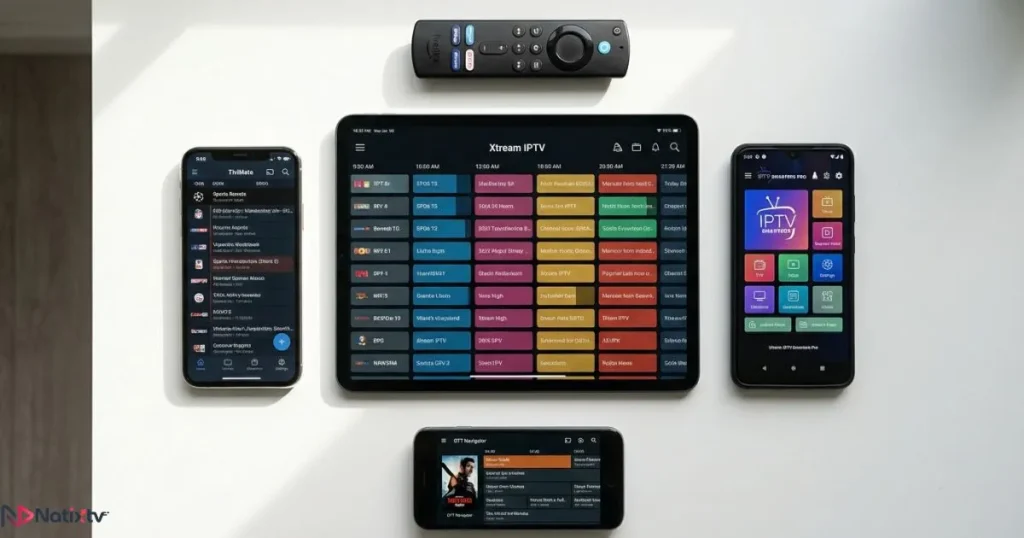
Android offers the widest selection when it comes to best iptv apps for mobile and TV box users, with full support for both M3U playlists and Xtream Codes. Here are the four strongest options this year:
TiviMate
TiviMate is consistently ranked among the best iptv apps for Android TV and Firestick users. Its interface is fast and polished, its EPG rendering is detailed, and it handles multiple playlists simultaneously without slowdown. The premium version adds catch-up TV, channel recording, and parental controls – making it a comprehensive home entertainment solution. For power users, TiviMate sets the benchmark.
IPTV Smarters Pro
IPTV Smarters Pro is one of the most versatile all-around players available. It runs on Android phones, tablets, and Android TV boxes, supports both M3U and Xtream Codes, and includes a built-in EPG viewer. It’s the natural choice for users who want broad compatibility without committing to a paid app straight away.
GSE Smart IPTV
GSE Smart IPTV stands out for its cross-platform availability and feature depth. The free tier is genuinely generous – custom playlists, multiple EPG sources, and hardware decoding are all included at no cost. It’s particularly practical if you switch between Android and iOS on a regular basis.
Duplex Play
Looking for an IPTV Smarters alternative with a more modern visual design? Duplex Play is worth your attention. Its interface is built to look and feel like a premium streaming service, with smooth navigation, Chromecast support, and a guided setup that makes onboarding effortless for new users.
All four apps work seamlessly when you connect your subscription via Xtream Codes – the most reliable method for linking any IPTV service to a player app today.
Best IPTV Apps for iPhone and iPad
iOS users face slightly more restrictions due to App Store policies, but the quality of available IPTV players has improved considerably. Here are the top choices for Apple devices in 2026:
GSE Smart IPTV (iOS)
The iOS version of GSE Smart IPTV mirrors its Android counterpart closely, making it ideal for multi-device households. It supports AirPlay, custom EPG URLs, and hardware decoding – a well-rounded performer on any iPhone or iPad.
Flex IPTV
Flex IPTV is built natively for Apple devices and integrates cleanly with AirPlay and Apple TV. Its minimal interface keeps navigation simple, and it handles large M3U playlists reliably without slowing down. A natural choice for anyone deeply embedded in the Apple ecosystem.
iPlayTV
iPlayTV is lightweight, stable, and particularly effective at managing EPG data. It stands out as one of the best iptv apps available on the App Store for iOS users who value simplicity and reliability above all else. If you’re based in the US and want access to both American and international channels, pairing any of these apps with a dedicated IPTV subscription for US viewers gives you an exceptional range of content.
Best IPTV Apps for Smart TV
Smart TVs operate within closed ecosystems, which limits your options compared to open Android platforms. That said, the best iptv apps for Smart TV in 2026 cover all the major manufacturers well:
Samsung (Tizen OS)
- Smart IPTV: One of the most trusted solutions for Samsung TVs, with reliable M3U playlist and EPG support
- SS IPTV: Free, stable, and compatible with multiple playlist formats straight out of the box
LG (webOS)
- SS IPTV: Available directly from LG’s app store, works reliably with standard playlists
- NetTV+: A polished player with a modern design built specifically for webOS users
Android TV and Google TV
If your Smart TV runs Android TV or Google TV, you have full access to the Play Store. TiviMate, IPTV Smarters Pro, and GSE Smart IPTV are all available and perform excellently in this environment. This is arguably the most versatile Smart TV setup for IPTV streaming available in 2026.
Best IPTV Apps for Firestick and Fire TV
Firestick remains one of the most popular IPTV devices in 2026, partly because of its low cost and partly because of how easily you can install third-party apps. The best iptv apps for Firestick users are TiviMate and IPTV Smarters Pro – both available through the Amazon Appstore or via sideloading using the Downloader app.
To install apps not listed in the Amazon store, follow these steps:
- Go to Settings – My Fire TV – Developer Options
- Enable “Apps from Unknown Sources”
- Install the Downloader app from the Amazon Appstore
- Use Downloader to navigate to your APK file’s URL and install it
Natixtv provides clear, step-by-step Firestick setup guides to walk you through every stage of the process, regardless of your technical experience level.
Free vs. Paid IPTV Apps: An Honest Comparison
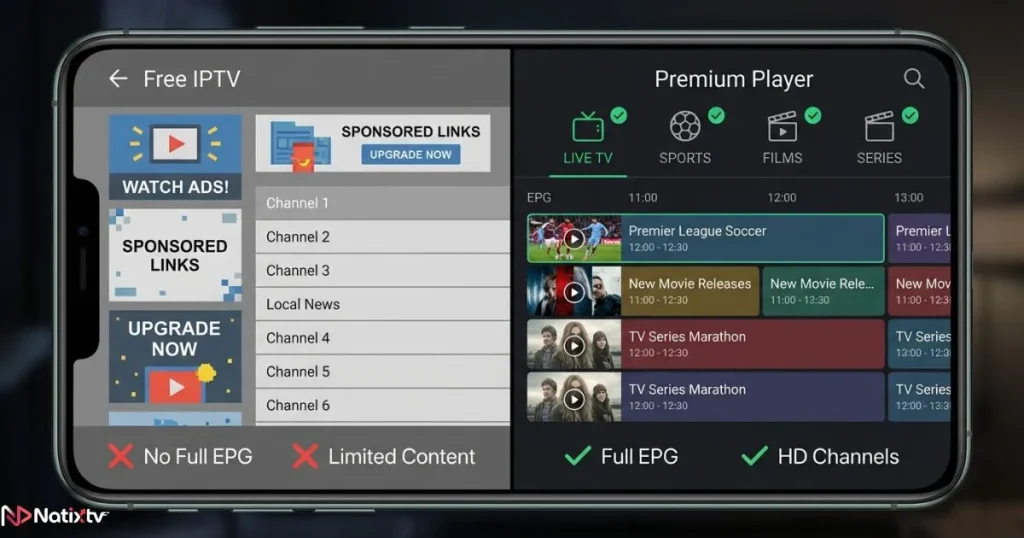
The free vs paid iptv apps question is one of the first things new users want to settle. Here’s a direct side-by-side comparison to help you decide what’s right for your setup:
| Feature | Free Apps | Paid Apps |
|---|---|---|
| Ad-free experience | No | Yes |
| Full EPG support | Limited | Yes |
| Multi-screen support | Rarely | Often |
| Regular updates | Inconsistent | Yes |
| Customer support | None | Included |
| M3U and Xtream Codes | Sometimes | Always |
| Recording and catch-up | Rarely | Often |
The bottom line: free apps can work perfectly well as players when connected to a quality IPTV subscription. Their hidden cost is usually ads, capped features, and inconsistent development. For the best overall experience, pairing a paid player with a reliable best iptv provider is the smarter long-term investment.
How to Set Up an IPTV App: Step by Step
Getting up and running with any of the best iptv apps in this guide follows the same straightforward process:
- Download your chosen app from the relevant store or via sideload
- Subscribe to an IPTV service and collect your M3U URL or Xtream Codes credentials from your provider
- Open the app settings and select “Add Playlist” or “Add Connection”
- Enter your login details – server URL, username, and password for Xtream Codes
- Load your playlist and wait for your full channel library to populate
- Sync your EPG to activate the full TV guide
- Start streaming and explore your content library
Top 6 IPTV Apps Compared at a Glance
Here’s a side-by-side overview of the best iptv apps recommended in this guide, so you can find your ideal match quickly:
| App | Platform | Free/Paid | EPG | M3U Support | Best For |
|---|---|---|---|---|---|
| TiviMate | Android TV, Firestick | Freemium | Yes | Yes | Power users |
| IPTV Smarters Pro | Android, iOS, TV | Free | Yes | Yes | All-around use |
| GSE Smart IPTV | Android, iOS | Freemium | Yes | Yes | Multi-device users |
| Flex IPTV | iOS, Apple TV | Paid | Yes | Yes | Apple ecosystem |
| Duplex Play | Android, TV | Freemium | Yes | Yes | Beginners |
| SS IPTV | Samsung, LG TV | Free | Yes | Yes | Smart TV users |
Fixing the Most Common IPTV App Problems
Even the best iptv apps can occasionally run into technical hiccups. Here’s how to resolve the most frequent issues quickly:
- Buffering: Check your internet speed (a minimum of 25 Mbps is recommended for 4K streams) and switch to a wired connection where possible
- EPG not loading: Re-enter your EPG URL in the app settings and force a manual refresh
- App crashing: Clear the app’s cache, update to the latest version, or perform a clean reinstall
- Channels not working: Double-check your M3U or Xtream Codes credentials directly with your IPTV provider
- Geo-restricted content: A trusted VPN service such as ExpressVPN can help you bypass regional blocks without significantly impacting stream quality
Frequently Asked Questions
What are the best iptv apps to use in 2026?
The best iptv apps in 2026 include TiviMate (ideal for Android TV and Firestick), IPTV Smarters Pro (a strong all-around option), GSE Smart IPTV (excellent for multi-device households), Flex IPTV (purpose-built for Apple devices), and SS IPTV (the go-to solution for Samsung and LG Smart TVs). Your ideal choice depends on your device and how you prefer to navigate your content.
Which IPTV app performs best on Firestick?
TiviMate and IPTV Smarters Pro are the leading choices for Firestick in 2026. Both offer fast EPG loading, smooth channel switching, and dependable Xtream Codes support. TiviMate’s premium version is particularly well-suited to the Firestick’s remote control interface and navigation style.
Are free IPTV apps safe to install?
As media players, free IPTV apps are generally safe to use. The key distinction is between the app itself and the content source. Always pair your player with a legitimate IPTV subscription from a trusted provider – unverified public playlist URLs can expose you to security risks and unreliable streams.
Can I use the same IPTV app on Android and iOS?
Yes. GSE Smart IPTV and IPTV Smarters Pro are both available on Android and iOS, offering a consistent cross-platform experience. If you regularly switch between Apple and Android devices, these two are the most practical choices for keeping a unified setup across screens.
Does Natixtv work with all the apps listed in this guide?
Yes. Natixtv is fully compatible with TiviMate, IPTV Smarters Pro, GSE Smart IPTV, Flex IPTV, Duplex Play, SS IPTV, and many more. It supports both M3U and Xtream Codes, works across all major devices including Firestick, Android TV, Apple TV, Smart TV, iOS, and Kodi, and includes a free 24 to 48-hour trial so you can verify your setup before committing to any plan.
Conclusion
The right IPTV setup comes down to two things: the right app and the right subscription. The best iptv apps covered in this guide each excel in their own context – from TiviMate’s premium interface for power users to SS IPTV’s simplicity for Smart TV owners. Matching the app to your device and your viewing habits is what unlocks the full potential of your IPTV experience.
In