You know that feeling: a big, beautiful screen sitting right in front of you, and nothing useful coming out of it. Maybe it’s the television you bought five years ago, just before smart TVs became standard. Maybe it’s a projector in your office boardroom, or a display mounted behind a bar. The hardware is perfectly good. The world just moved on, and left it behind.
That is exactly the kind of frustration an HDMI to IPTV converter was designed to fix. Instead of replacing your screen, you add a small piece of hardware that bridges the gap between your existing video source and the modern world of IP-based streaming. The result: any display becomes a live, networkable screen, reachable from anywhere on your local network or beyond.
Before you decide whether to buy one, though, you need to understand what it actually does, when it genuinely makes sense, and when a simpler option like a quality best iptv subscription will serve you far better. This guide covers all of it, clearly and honestly.
Table of Contents
What Is an HDMI to IPTV Converter and How Does It Work?
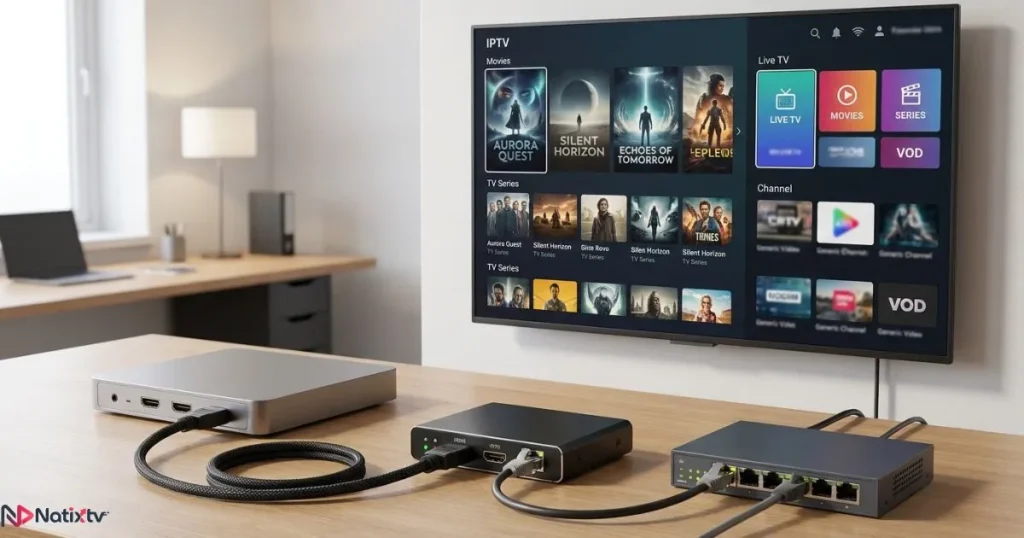
At its core, an HDMI to IPTV converter is a hardware encoder. It sits between your video source, a camera, a set-top box, a gaming console, a laptop, and your network. It captures the raw HDMI signal coming out of that source and re-encodes it into a compressed digital stream that can travel over IP. The output is a stream URL that any IPTV-compatible device on your network, or on the internet, can open and play.
Think of it as a translation device. Your HDMI cable speaks a language that only connected displays understand. The encoder learns that language, converts it to something the internet understands, and rebroadcasts it. The screen on the receiving end never knows the signal started life as a physical cable connection.
Most consumer-grade devices support 1080p at 30 to 60 frames per second, and latency typically ranges from under one second on dedicated hardware to three to five seconds on software-based solutions. For practical live streaming or in-building distribution, hardware encoders are always the better choice.
The Key Components Inside an HDMI to IPTV Encoder
Understanding the internals helps you shop smarter. Here is what you will find inside a typical HDMI to IPTV encoder:
- HDMI input port: Captures video and audio from any compatible source, including cameras, gaming consoles, cable boxes, and laptops.
- Encoding chipset: Compresses the raw signal using H.264 (AVC) or H.265 (HEVC). H.265 delivers the same quality at roughly half the bitrate.
- Network output: Usually a Gigabit Ethernet port, sometimes paired with Wi-Fi on lower-cost models.
- Web management interface: A browser-accessible dashboard where you set the output protocol, resolution, and bitrate.
- Stream URL generator: Produces the address your IPTV players will connect to, using protocols like HLS, RTSP, RTMP, or UDP.
Professional models often add SDI inputs, redundant stream outputs, and API-level control for integration into larger broadcast systems.
HDMI to IPTV Converter vs. Other Streaming Solutions
The table below puts this device in context alongside the two most common alternatives.
| Feature | HDMI to IPTV Converter | Streaming Stick (e.g., Firestick) | Software Encoder (e.g., OBS) |
|---|---|---|---|
| Requires a PC | No | No | Yes |
| Hardware independence | Yes | Partial | No |
| Input source flexibility | Any HDMI source | Limited | Limited |
| Professional use | Yes | No | Moderate |
| Latency | Low to ultra-low | Medium | Variable |
| Cost range | $80 – $500+ | $30 – $60 | Free (+ PC cost) |
| Best for | Broadcast, hotels, enterprise | Home streaming | Gamers, online streamers |
The conclusion is clear: a streaming stick receives content from the internet for your TV. An HDMI to IPTV converter does the opposite. It takes a local signal and sends it across a network. These are fundamentally different tools built for fundamentally different jobs.
When Do You Actually Need an HDMI to IPTV Converter?
Not everyone does. Being honest about this is important, because the device is a real investment and deserves a real use case. Here are the scenarios where it genuinely earns its place.
- Broadcasting live events over a local network: Sports bars, houses of worship, corporate events, and stadiums all need one signal distributed to many screens without running individual cables everywhere.
- Distributing a single source to multiple rooms: Hotels, hospitals, schools, and clinics use HDMI network streaming to push one channel feed to dozens of displays over existing Ethernet infrastructure.
- Streaming a legacy set-top box: If your cable or satellite box lacks smart app support, an HDMI to IPTV converter lets you watch it on any IP-connected device in your home.
- Giving life to non-smart displays: Older TVs, projectors, and monitors with HDMI inputs but no network capability can be made accessible over IP with one encoder on the source side.
- Remote production workflows: AV professionals use HDMI video to IPTV encoding to send camera feeds from one location to a remote production suite over the internet.
- Gaming console streaming to another room: Rather than buying a second console, you capture the HDMI output and stream it to any screen in the house.
Enterprise and Institutional Use: The Most Common Application
The majority of HDMI to IPTV encoder sales go to enterprise buyers: hospitality, healthcare, education, and corporate environments. The economics are compelling. Running a single Ethernet backbone and placing an encoder at the source costs a fraction of what cable infrastructure would require to reach every display individually.
In a hotel, for example, a headend system might use a rack of encoders, each handling one broadcast channel, distributing every signal to hundreds of rooms over the existing network. Guests use an IPTV player on their room TV or a connected set-top box to select channels. The user experience is seamless, and management is centralized.
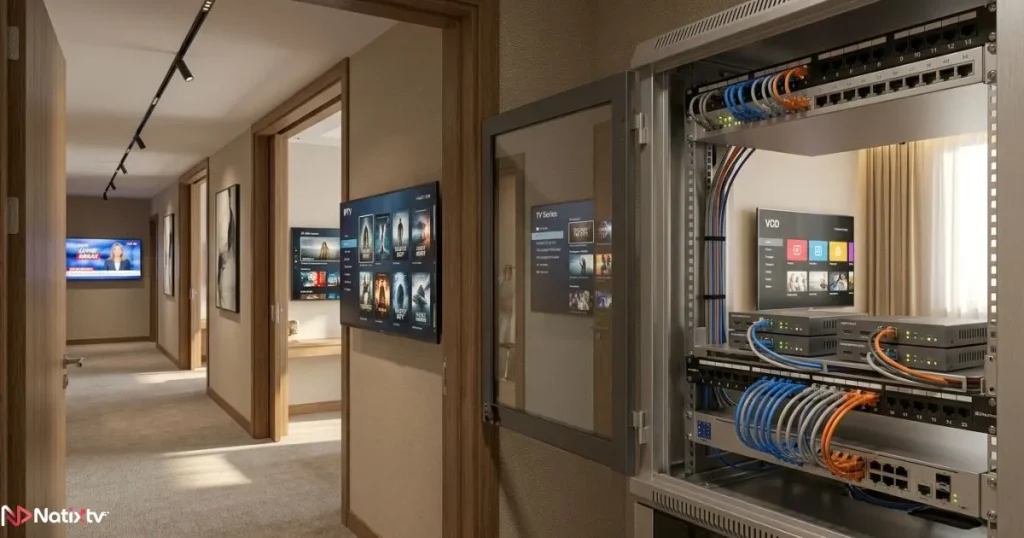
For a more practical guide on setting up this kind of system end-to-end, the complete HDMI streaming setup walkthrough covers the full process from encoder configuration to player compatibility.
Home Users: Is an HDMI to IPTV Converter Worth It?
For most people watching TV at home, the honest answer is: probably not. If your goal is access to live channels, sports, and on-demand content, a quality IPTV subscription already delivers that to your smart TV, phone, or streaming device, with no encoder required and no extra hardware cost.
The cases where home use makes real sense are narrower: you want to stream your satellite box to a screen in another room, you have a high-end projector without network capabilities, or you want to share a security camera feed across devices on your home network. Outside those specific scenarios, the simpler path is almost always a subscription from a provider like best iptv, which works on virtually any device you already own.
Types of HDMI to IPTV Converters: From Budget to Professional
The market spans a wide range, and getting the tier right matters as much as getting the brand right. Here is how the categories break down.
| Tier | Price Range | Typical Use | Key Features |
|---|---|---|---|
| Entry-level | $80 – $150 | Home, small office | 1080p, H.264, Ethernet output |
| Mid-range | $150 – $350 | SMB, education, worship | H.265, low latency, dual stream output |
| Professional | $350 – $1,000+ | Broadcast, hospitality | 4K, redundant streams, API control, SDI input |
Entry-level units are fine for non-critical use where a few seconds of latency is acceptable. Professional models are built for reliability under load, with failover options, remote management, and certifications that institutional buyers require.
Key Technical Specs to Look For Before You Buy
When comparing devices, run through this checklist before committing.
- Supported resolutions: 720p, 1080p, or 4K – match to your source and your network’s capacity
- Codec support: H.264 is universal; H.265 saves up to 50% bandwidth for the same visual quality
- Output protocols: HLS for broad device compatibility, RTSP for low-latency local streams, RTMP for pushing to platforms
- Latency specification: under 300ms for live event use; up to 5 seconds is acceptable for non-live distribution
- Network interface: Gigabit Ethernet is essential for reliable 1080p or higher streaming
- HDCP compliance: verify the encoder’s position on HDCP before purchasing (see the section below)
- Management interface: a clean web UI or mobile app makes day-to-day operation practical
- Power supply: PoE (Power over Ethernet) support eliminates the need for a separate power adapter at the device location
The IPTV video encoder you choose should also be verified against your target IPTV player. Not every player handles every protocol equally well, so confirming compatibility before purchase saves a frustrating return process.
The HDCP Problem Nobody Warns You About
HDCP, or High-bandwidth Digital Content Protection, is a copy-protection standard baked into most commercial video sources: cable boxes, streaming sticks, Blu-ray players, and even some gaming consoles. It encrypts the HDMI signal specifically to prevent unauthorized capture and redistribution.
Here is the problem: most HDMI to IPTV converters cannot decode HDCP-protected signals. This is not a flaw in the encoder; it is the legal intent of the standard. If you plug an HDCP-outputting source into your encoder, you will get a blank stream or an error, not an image.
The solutions are limited but real: use sources that output without HDCP (many cameras, computers, and unencrypted set-top boxes qualify), use the analog audio/video output if your source provides one, or work with a licensed commercial decryption system designed for broadcast use. Check this before you buy anything. It will save you significant frustration.
If your device needs to travel over the internet and you want to protect your stream from throttling or geo-blocking, pairing your encoder setup with a reliable VPN designed for IPTV streaming is a practical step that many broadcasters overlook.
How to Set Up Your HDMI to IPTV Converter: A Step-by-Step Overview
The setup process is more straightforward than most people expect. Here is the standard workflow for a standalone hardware encoder.
- Connect the source: Plug your HDMI cable from your camera, console, or set-top box into the encoder’s HDMI input port.
- Connect to your network: Run an Ethernet cable from the encoder to your router or managed switch. Wired connections are always preferred over Wi-Fi for stability.
- Access the management interface: Open a browser on any device on the same network, enter the encoder’s IP address, and log in to the web dashboard.
- Configure the output stream: Choose your protocol (HLS for broad compatibility or RTSP for low-latency local use), set your resolution, and dial in a bitrate. For 1080p, a starting point of 5 to 8 Mbps is solid.
- Copy the stream URL: The encoder generates a unique URL for your stream. Copy it carefully.
- Open an IPTV player on your target device: Enter the stream URL into VLC, TiviMate, IPTV Smarters, or your smart TV’s built-in player.
- Test and refine: Check latency, check picture quality, and adjust bitrate down if your network struggles, or up if you have headroom and want sharper detail.
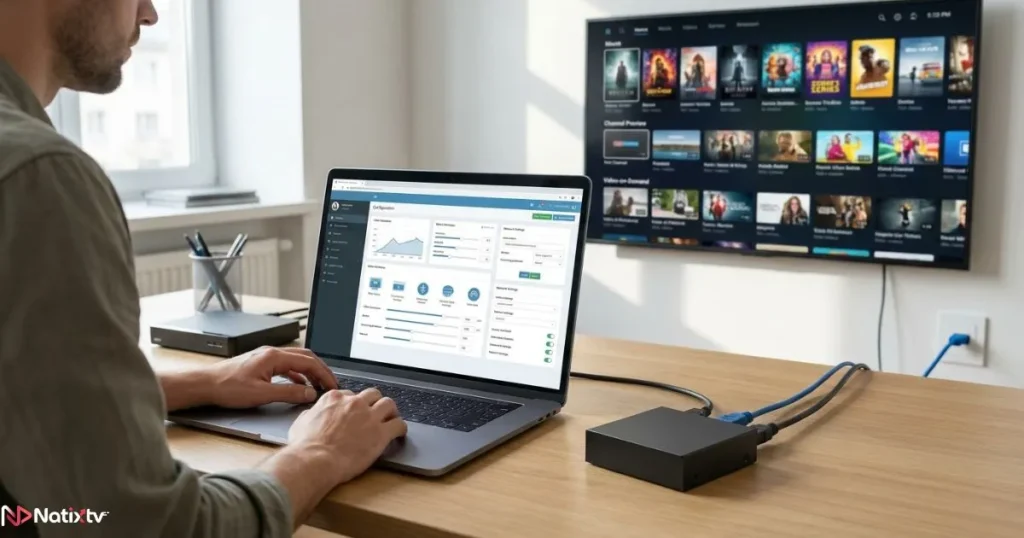
Pro tip: Test your stream with a clock visible in frame. It gives you an immediate, precise read on actual latency without needing a second device or stopwatch.
Compatible IPTV Players and Apps
Your stream URL will work with a broad range of players across platforms.
- VLC Media Player: Universal, free, and handles HLS, RTSP, and RTMP natively on every platform.
- TiviMate: A polished Android and Android TV player with M3U playlist support and a clean EPG interface.
- IPTV Smarters Pro: Popular on both Android and iOS, with multi-screen and Xtream Codes support.
- Kodi with PVR add-ons: Flexible and open-source, though setup requires more technical comfort.
- Samsung and LG built-in players: Most modern smart TVs support RTSP or HLS streams through their native media apps.
If you are looking for a tested, fully compatible IPTV setup that works across all of these players and devices without any encoder hardware, best iptv from Natixtv is worth exploring, with a free trial period of 24 to 48 hours available to new subscribers.
HDMI to IPTV Converter vs. an IPTV Subscription: Know Which One You Need
This is the most important distinction in the entire article, and it is worth being direct about. These two things solve different problems.
An HDMI to IPTV converter is an input solution. It takes a signal you already have, in physical form at a physical location, and makes it deliverable over a network. You need a source. You need a network. You need a reason to distribute that specific signal to other devices.
An IPTV subscription is a content solution. It delivers channels, sports, and on-demand programming to your device without you owning or operating any source. There is no encoder to configure, no stream URL to manage, and no hardware beyond the device you are already watching on.
When to Buy a Hardware Encoder
- You are distributing a proprietary or local signal, such as a security camera or satellite box, to multiple devices
- You are building a headend system for a hotel, hospital, or campus
- You need to re-stream a non-IP source into an existing IP infrastructure
- You are producing live events and need to send a camera feed to remote viewers
When an IPTV Subscription Is All You Need
- You want to watch live TV, international channels, sports, or on-demand content
- Your device already has a network connection or HDMI port
- You do not have a proprietary signal to encode or redistribute
- You want the simplest, fastest path to a full channel lineup
For most households, the second list describes the real situation. A quality IPTV subscription from a provider like Natixtv is available on smart TVs, smartphones, tablets, Android boxes, and computers, with no hardware investment required. You can even connect your IPTV subscription to your TV via HDMI using any streaming device you already own, making the entire setup plug-and-play.
Frequently Asked Questions
What exactly does an HDMI to IPTV converter do?
An HDMI to IPTV converter captures the video and audio signal from any HDMI source and re-encodes it into a network-compatible IP stream. This allows the signal to be watched on any IPTV-capable device over a local network or the internet, without needing to run physical cables to every screen.
Do I need an HDMI to IPTV converter to watch IPTV channels?
No. If your goal is simply to watch live TV or on-demand content, you do not need a converter. An IPTV subscription from a provider like Natixtv works directly on smart TVs, phones, tablets, and set-top boxes. No extra hardware is required, and you can try it free for 24 to 48 hours.
Can I use an hdmi to iptv converter with a cable or satellite box?
Yes, provided the box does not output HDCP-encrypted content. Many set-top boxes have unencrypted HDMI or component outputs that can be captured cleanly. Always verify the HDCP status of your specific device before purchasing an encoder, as encrypted outputs cannot be captured by standard hardware.
What network speed do I need for stable HDMI network streaming?
For 1080p streaming, plan for a dedicated bandwidth of 5 to 8 Mbps. For 4K, you will need 15 to 25 Mbps. A wired Gigabit Ethernet connection at both the encoder and the viewer device is the most reliable setup. Wi-Fi can work but introduces latency variability that becomes noticeable in live scenarios.
How much does a quality HDMI to IPTV encoder cost?
Entry-level models suitable for home or small office use start at around $80 to $120. Mid-range units with H.265 support and lower latency fall in the $150 to $350 range. Professional-grade encoders with 4K output, multi-channel support, and broadcast-grade reliability typically start at $350 and can exceed $1,000 for advanced deployments.
Is it legal to use an HDMI to IPTV converter?
The hardware itself is completely legal to own and operate. What matters is the content you capture and distribute. Streaming content you have the rights to, such as your own camera feeds, presentations, or unencrypted local broadcasts, is entirely lawful. Capturing and redistributing copyrighted content without authorization is not, regardless of the hardware used.
Conclusion
An HDMI to IPTV converter is a genuinely powerful device, but its power is specific. It solves a real problem for venues, enterprises, and AV professionals who need to take a physical signal and make it travel over a network. If that describes your situation, the investment is well justified and the technology is mature enough to deliver reliably across a wide range of budgets.
For everyone else, and that is the majority of people reading this, the better path is cleaner, faster, and cheaper. A well-built IPTV subscription gives you access to thousands of live channels, sports packages, and on-demand content on any device you already own. No encoding required. No stream URL to manage. No HDCP headaches.
Natixtv is built exactly for that experience. Compatible with smart TVs, Android devices, iOS, set-top boxes, and computers, it is one of the most accessible ways to get into quality IPTV streaming today. And with a free trial period of 24 to 48 hours, you can verify the quality and channel selection for yourself before committing to anything. Start your free trial at best iptv and see why it is the choice for viewers who want more television and less configuration.
Ready to stream smarter? Try Natixtv free for 24 to 48 hours. No hardware. No setup headaches. Just TV.Start Your Free Trial on Natixtv