You know that feeling. You sign up for an iptv premium service, ride the wave of excitement through a smooth Tuesday-afternoon trial, and then — Friday night, the big match, everyone on the couch — the screen freezes. The buffer wheel spins. The moment is gone. If you want the best iptv experience your money can buy, a trial period is only as good as the method you bring to it.
Most people treat their free trial like a gift: they browse around, watch a few minutes of something, and call it done. That approach tells you almost nothing about how the service will perform when it actually matters — peak hours, live events, multiple devices running at once. The result is a subscription purchased on false confidence, followed by a frustrating first month.
This guide gives you a structured, repeatable testing framework built around the five metrics that define a reliable iptv premium service. You will learn how to stress-test stream quality, measure channel-switching delays, verify EPG accuracy, evaluate VOD playback, and compare performance across your devices. By the end, you will have a completed scorecard and a clear yes or no answer — backed by real data, not gut feeling.
Table of Contents
Why Most IPTV Trials Fail to Tell You the Truth
The Trap of Testing at the Wrong Time
The single most common mistake during an iptv premium service trial is testing at the wrong time. A service that streams perfectly at 2 PM on a Wednesday can fall apart completely at 9 PM on a Saturday. IPTV infrastructure, like any shared network resource, is under heavy load during prime time. If you never test under that load, you are evaluating ideal conditions — not real life.
Peak viewing hours typically run from 8 PM to 11 PM, Thursday through Sunday. That is when thousands of subscribers are simultaneously streaming the same live sports events, news broadcasts, and prime-time shows. It is also when servers are most likely to throttle, buffers are most likely to stall, and channel switching is most likely to drag.
Off-peak hours still matter — but as a control variable, not as your main test window. If performance is excellent at 11 AM and poor at 9 PM, you have found a real service-side problem. If it is poor at both times, you might be looking at a network issue on your end.
What a Trial Period Should Actually Answer
Before you open the app, get clear on the five questions your trial needs to answer:
- Is live IPTV stream quality stable during peak hours?
- How fast does the service respond when you change channels?
- Does the EPG match what is actually broadcasting right now?
- How quickly does VOD content start, and can you seek without re-buffering?
- Is the experience consistent across your devices and connection types?
These five questions form the backbone of everything that follows. According to discussions across major IPTV user forums, more than 60% of subscribers who cancel within their first month cite problems they could have identified during a proper trial. A structured approach makes the difference.
Setting Up Your IPTV Performance Test Environment
Choosing the Right Testing Windows
Plan your testing sessions before you begin. A well-used 24 to 48 hour trial — like the one offered by Natixtv, which walks you through setting up your stream correctly from day one — can cover all the ground you need if you schedule deliberately. Aim for three distinct sessions:
- Peak session: 8 PM to 10 PM on a Thursday, Friday, or weekend evening
- Off-peak session: Mid-morning on a weekday (your performance baseline)
- Live event session: During a major match, broadcast, or scheduled TV event
Running all three sessions gives you a picture of the service under maximum stress, minimum stress, and real-world competitive conditions.
Devices You Must Include in Your Test Matrix
A reliable iptv premium service should perform consistently regardless of what screen you are watching on. Test on at least two of the following device types:
| Device Type | Why It Matters | Key Variable to Watch |
|---|---|---|
| Smart TV (Android TV / Tizen) | Primary living-room screen for most households | App crashes, UI lag during navigation |
| Smartphone (iOS / Android) | Common for mobile and 4G use cases | Adaptive bitrate behavior on cellular |
| Amazon Firestick / Apple TV | Most popular dedicated IPTV sticks | Buffer frequency and recovery time |
| PC or browser | Useful fallback and secondary screen | CPU load, player compatibility |
| Tablet | Tests concurrent stream behavior | Performance when bandwidth is shared |
Natixtv supports all of the above device types out of the box, which means your trial can cover the full matrix without workarounds.
Checking Your Internet Baseline First
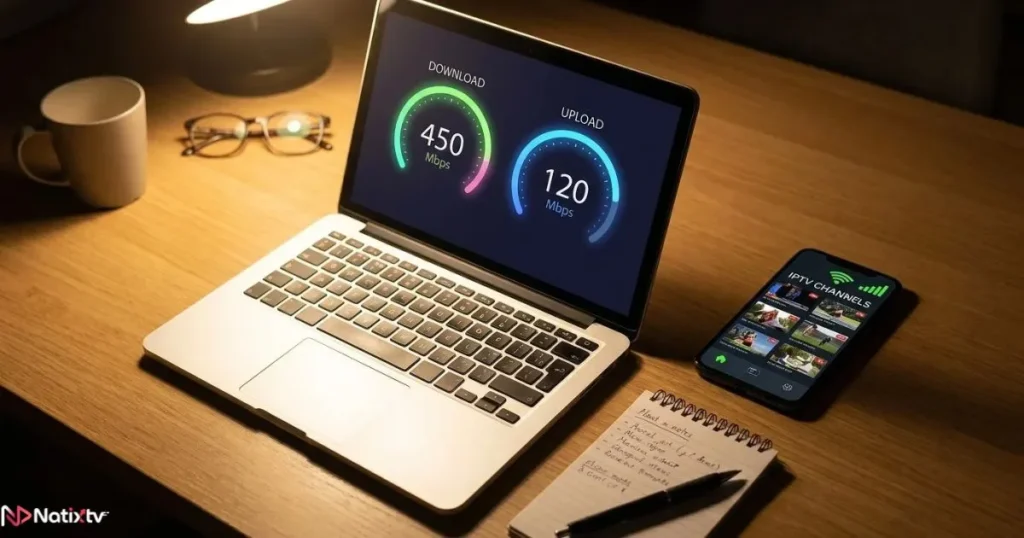
Before every test session, run a quick speed test using Fast.com or Speedtest.net. Record the result. This is your baseline. If a problem appears later, you can cross-reference it against your connection speed and rule out your ISP before blaming the service.
Minimum recommended speeds for IPTV stream quality:
- 10 Mbps for standard definition
- 25 Mbps for Full HD
- 50 Mbps or above for 4K content (and if you want to understand why the gap matters visually, the difference between 4K and HD IPTV streams goes deeper than most people realize)
If your connection clears these thresholds and the service still struggles, the problem is almost certainly on the service side — a critical distinction you will revisit in a later section.
The 5-Point IPTV Trial Checklist You Should Run Every Session
Test 1 – Live Stream Stability During Peak Hours
This is the most important IPTV service performance test you will run. Choose a popular live channel — a major sports network or a prime-time entertainment channel — and watch it uninterrupted for 30 minutes during peak hours. Do not change anything. Just observe and note:
- Any micro-freezes or stutters (even brief ones)
- Visible drops in picture quality (pixelation, resolution shifts)
- Full interruptions requiring a manual reload
- Audio-video sync issues
A strong iptv premium service should deliver zero interruptions during this window. One or two micro-stutters under two seconds of recovery is borderline acceptable. Anything more than that during a 30-minute block is a red flag at the service level.

Test 2 – IPTV Channel Switching Speed
IPTV channel switching delay — commonly called zapping lag — is one of the most overlooked quality indicators, but it defines the texture of daily use. Every time you flick between channels, you are measuring how fast the service can load a new stream from scratch.
To measure it accurately, use a timer and switch between 10 different channels across at least three categories (sports, news, entertainment). Record the delay between pressing the button and seeing a stable image.
- Under 2 seconds: excellent
- 2 to 5 seconds: acceptable for occasional use
- Over 5 seconds: too slow for comfortable daily viewing
Run this test twice: once off-peak and once during your peak session. A service that zaps quickly at noon but crawls at 9 PM has a capacity problem, not a technology one.
Test 3 – IPTV EPG Accuracy Against Live Schedules
The Electronic Program Guide is your navigation tool inside any iptv premium service. IPTV EPG accuracy matters because an unreliable guide breaks the core TV experience — you cannot plan what to watch, set reminders, or trust the “now playing” information. A poorly maintained EPG is also a strong signal that the provider is not actively maintaining their service.
To check EPG accuracy during your trial:
- Open the EPG for three to five channels you know well
- Compare the listed program titles against the official broadcaster website or a TV schedule site like TV Guide
- Check for time offsets (is the guide running 15 minutes behind or ahead?)
- Look for blank or missing entries across multiple time slots
- Verify that the description and metadata (episode title, synopsis) match the actual broadcast
Minor inconsistencies on obscure channels are forgivable. Systematic offsets or empty slots across major channels indicate a service-side maintenance problem — not something you can fix on your end.
Test 4 – IPTV VOD Startup Time and Seeking
IPTV VOD playback quality depends on a completely different part of the infrastructure than live streams. The VOD library pulls from a content delivery network rather than a live broadcast feed, which means its performance can vary independently. Test it separately.
Choose a popular HD film from the VOD catalog and run through this protocol:
- Press play and time how long it takes for the video to begin playing
- Let it run for five minutes, then seek forward by 20 minutes
- Note whether the seek causes re-buffering or loads instantly
- Pause for five minutes, then resume — does it reload from scratch or continue seamlessly?
Target performance for a quality iptv premium service:
- Startup under 5 seconds: good
- Seek without additional buffering: excellent
- Seamless resume after a long pause: excellent
Test 5 – Multi-Device and Multi-Connection Consistency
Repeat tests 1 through 4 — or at minimum tests 1 and 2 — on a second device using a different connection type. If your first session was on a Smart TV over Wi-Fi, run the second on a smartphone using 4G. This cross-device, cross-connection repetition is what separates a proper IPTV subscription evaluation from a casual browse.
If performance is consistent across both environments, you have strong evidence that the service itself is reliable. If it degrades on one device or one connection type, you are probably dealing with an app-level problem rather than a service-level one — a distinction that matters enormously when you are deciding whether to subscribe.
The Simple IPTV Trial Scorecard
How to Use It
After each of your three planned sessions, fill in one column of the scorecard below. Score each test from 1 (poor) to 5 (excellent). At the end of your trial, average your scores across sessions. The resulting number is your decision metric.
Scorecard Template
| Test | Session 1 | Session 2 | Session 3 | Average |
|---|---|---|---|---|
| Live stream stability (peak hours) | /5 | /5 | /5 | /5 |
| IPTV channel switching speed | /5 | /5 | /5 | /5 |
| EPG accuracy vs. live schedule | /5 | /5 | /5 | /5 |
| VOD startup and seek behavior | /5 | /5 | /5 | /5 |
| Multi-device consistency | /5 | /5 | /5 | /5 |
| Total | /25 | /25 | /25 | /25 |
Reading Your Score
| Average Total | Verdict |
|---|---|
| 20 to 25 | Subscribe with confidence |
| 13 to 19 | Acceptable – monitor performance in the first week |
| Below 13 | Do not subscribe – look for a better provider |
App Problem vs. Service Problem: How to Tell the Difference
This is one of the most practically useful skills you can develop when evaluating any iptv premium service — and the one most guides ignore entirely. Not every problem you encounter is the provider’s fault. Some issues live at the app layer and are fully fixable without changing your subscription.
Signs the Problem Is in the App
- The official app buffers, but loading the same stream in VLC or TiviMate plays cleanly
- The interface is sluggish but the video itself is sharp and stable
- Errors disappear after a fresh install or clearing the app cache
- Only one device has issues while others using the same connection are fine
Signs the Problem Is on the Service Side
- Buffering is identical across every app and every device you test
- Problems appear specifically and consistently during peak hours
- High-demand channels (live sport, prime-time TV) suffer while low-traffic channels play fine
- EPG is systematically wrong across multiple channels, not just one
The Dual-Player Test
If you are unsure which layer the problem sits in, run a dual-player test. Load the same stream in two different apps at the same time. If one plays and the other does not, you have isolated an app-level issue. If both struggle simultaneously, the problem is upstream at the service. This single test can save you from canceling a perfectly good subscription over a broken app — or from renewing a bad service because your device was misbehaving.
Making the Final Call: Is This IPTV Premium Service Worth It?

The 3 Non-Negotiables Before You Subscribe
Your scorecard will capture the nuance, but these three criteria are binary. If any of them fail consistently, no other score can compensate:
- Stability during prime time. If the iptv premium service buffers during your peak-hour test, it will buffer on the nights you care most about.
- Acceptable channel-switching speed. Zapping lag above five seconds makes casual browsing painful and kills the traditional TV-watching experience.
- Consistent performance across devices. A service that works only on one platform is not a premium offering.
When a Lower Score Does Not Mean “No”
A score of 14 to 17 is not automatically a dealbreaker. There are situations where subscribing still makes sense:
- Every problem you identified was at the app layer, not the service layer
- The support team responded clearly and quickly when you contacted them during the trial
- The channel lineup and VOD catalog match your needs better than any alternative
In these cases, subscribe on a short-term plan first and monitor for one to two weeks before committing to a longer cycle.
Making the Most of a 24 to 48 Hour Trial
A short trial window rewards people who plan. Before you activate your free access, block out your three test sessions in your calendar. Start with your peak-hour session on the very first evening — do not save it for day two. Test the support channel on day one with a genuine question, even a simple one. And close your trial by filling in the scorecard while the experience is still fresh.
Natixtv offers a 24 to 48 hour free trial compatible with Smart TV, Firestick, iOS, Android, PC, and more. If you apply this framework from the first hour, that window is more than enough to reach a fully informed decision. The best iptv subscriptions are the ones you choose deliberately — not the ones you stumble into.
Frequently Asked Questions
How do I know if an iptv premium service is truly reliable before I subscribe?
Run the five-test framework described in this guide during the free trial period, focusing your first session on peak viewing hours. A provider that scores 20 or above out of 25 across three separate sessions is demonstrating real-world reliability — not just good performance on a quiet afternoon.
What is a good channel-switching speed for an IPTV service?
Under two seconds from button press to stable image is excellent. Two to five seconds is acceptable for most viewers. Anything above five seconds will feel noticeably sluggish in daily use and suggests the service is under capacity strain or using slow stream initialization.
Can EPG inaccuracy be fixed by the user?
Sometimes. Many IPTV apps allow you to force a manual EPG refresh, which can resolve a temporary sync delay. But if the EPG is systematically wrong across multiple major channels — consistent offsets, blank listings, wrong metadata — that is a maintenance failure on the provider’s side and cannot be fixed from your end.
How do I tell whether buffering is caused by my internet connection or the IPTV service?
Start with a speed test before each session and compare your result against the recommended thresholds (25 Mbps for Full HD). If your connection clears the threshold and buffering still occurs exclusively during peak hours and equally across all your apps and devices, the problem is service-side. If buffering appears at all hours and only on one device or app, investigate your local network or the specific application first.
Is a 24-hour free trial enough to properly evaluate an IPTV service?
Yes — if you use it deliberately. One peak-hour session, one off-peak session, and a quick support interaction will cover the essential evaluation criteria. Natixtv’s 24 to 48 hour trial window is designed around exactly this kind of focused testing, giving you real conditions rather than a curated demo environment.
Should I test VOD separately from live channels?
Always. Live streaming and VOD content rely on different infrastructure. A provider can have excellent live stream stability and mediocre VOD performance — or the reverse. Testing them in the same session with different scoring criteria ensures you evaluate the full offering rather than just one half of it.
Stop Guessing, Start Testing: Your IPTV Trial Is a Tool
A free trial for an iptv premium service is not a gift. It is a window. How much truth you get out of it depends entirely on how deliberately you use those 24 to 48 hours. The framework in this guide gives you a structured, repeatable method that covers the five metrics that actually matter: live stability, channel-switching speed, EPG accuracy, VOD performance, and multi-device consistency.
The scorecard ties it all together. Three sessions. Five tests. Twenty-five points maximum. A score above 20 means you have found a service worth your subscription. Below 13, move on without regret. Between those numbers, use the app-versus-service diagnostic to decide whether the problems you saw are fixable.
Stop subscribing on hope and canceling out of frustration. Apply this checklist to your next free trial and let the data make the decision for you. For a starting point that is built to perform across all your devices, explore the best iptv subscription options at Natixtv — and use every hour of the free trial the right way.